Showing posts with label Linux. Show all posts

Thursday, August 12, 2021

Using vi, the Unix Visual Editor

(Anhgolden's Blog) - Using vi, the Unix Visual Editor

Edit file
#vi [filename].txt

Insert (or text) mode
<Esc>

Exiting
:wq    Write, then quit
:q!      Quit without saving changes to file

Coping and Pasting text
yy     Copy (yank) the current line 

6yy   Copy (yank) six lines, beginning with the current line 

yw    Copy the current word 

p       Put the text after the cursor position 

P       Put the text before the cursor position


Read More »

Friday, August 22, 2014

UID of script “/home/…/public_html/index.php” is smaller than min_uid

(Anhgolden's Blog) - UID of script “/home/…/public_html/index.php” is smaller than min_uid

Khi tạo file hoặc up file từ localhost lên server (linux) bị lỗi như trên. Nguyên nhân liên quan đến User/Ownership của file và thư mục được up lên.

Kiểm tra User and Ownership bằng lệnh:
# ls -la

Thay đổi User/Ownership bằng lệnh:
# chown -R {root}:{root} /home/…/public_html/{file.php}


Read More »

Monday, July 7, 2014

Sửa lỗi mạng eth0 sau khi Clone VMWare

(Anhgolden's Blog) - Sau khi Clone VMWare xong, thì bị lỗi không nhận dạng network (ifconfig). Sau khi tìm hiểu, nguyên nhân do khi Clone VMWare, VMWare sẽ tự động tạo ra MAC add mới, tuy nhiên file config đang lưu MAC add cũ (nguồn được Clone), nên không nhận dạng được network.

Cách sửa lỗi như sau:

B1: Remove file config cũ
#rm -f /etc/udev/rules.d/70-persistent-net.rules

B2: Reboot
#reboot

B3: Kiểm tra MAC add mới
a) Cách 1: Bằng VMWare config:
Ghi lại địa chỉ Mac mới.

b) Cách 2: Gõ lệnh
#vi /etc/udev/rules.d/70-persistent-net.rules

Sửa phần NAME="eth1" thành NAME="eth0" (Số không)
Ghi lại địa chỉ Mac mới.

B4: Sửa file Network


Gõ lệnh
#vi /etc/sysconfig/networking/devices/ifcfg-eth0

Sửa lại địa chỉ Mac mới (ở bước 3)


B5: Restart service
#service network restart
Read More »

Wednesday, October 16, 2013

Linux mysql syntax

(Anhgolden's Blog)-Sưu tầm

Export mysql db:
#mysqldump -u [USERNAME] -p [DBNAME] | gzip > [/path_to_file/DBNAME].sql.gz
or
#mysqldump -u [USERNAME] -p [DBNAME] > [/path_to_file/DBNAME].sql
#gzip -d [/path_to_file/DBNAME].sql.gz

Import mysql db:
# gunzip mysqldump.sql.gz
# mysql -u username -p -h localhost test-database < mysqldump.sql
password: _

Use mysql:
#mysql -u [USERNAME] -p
SHOW DATABASES;
DROP DATABASE [DBNAME];
CREATE DATABASE [DBNAME];
USE [DBNAME];
SOURCE [/path_to_file/DBNAME].sql;

Read More »

Wednesday, July 3, 2013

Linux: Set date time

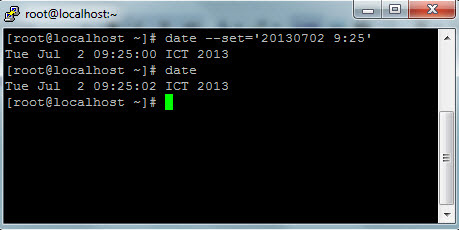
(Anhgolden's Blog)-Để kiểm tra ngày giờ hiện hữu ta dùng lệnh date. Còn để thiết lập lại ngày và giờ cho linux ta dùng lệnh # date --set='yyyymmdd hh:mm:ss'

Ngoài việc chủ động Set datetime, còn có thể thực hiện đồng bộ datetime với NTP Server (Network Time Protocol) bằng lệnh:
# ntpdate pool.ntp.org
Read More »

Tuesday, March 5, 2013

Upgrade php version 5.1.6 to 5.2.x on CentOS

(Anhgolden's Blog)-Yêu cầu cấu hình server khi install SugarCRM 6.2.x trở lên, đòi hỏi php version 5.2 hoặc 5.3. Xin chia sẻ cách Upgrade php version từ 5.1.6 lên 5.2

Kiểm tra phiên bản php hiện hành:
# php -v

Kiểm tra phiên bản HĐH:
# cat /etc/redhat-release

Tạo và copy đoạn code sau:
# vi /etc/yum.repos.d/utterramblings.repo
[utterramblings]
name=Jason's Utter Ramblings Repo
baseurl=http://www.jasonlitka.com/media/EL$releasever/$basearch/ 
enabled=1 
gpgcheck=1 
gpgkey=http://www.jasonlitka.com/media/RPM-GPG-KEY-jlitka

Upgrade các package mới
# yum update

Read More »

Lỗi session.save_path

(Anhgolden's Blog)-Khi install một số chương trình như Joomla, SugarCRM... một số trường hợp xuất hiện thông báo lỗi "session save path unwriteable". Điều này có nghĩa thư mục lưu trữ các session đăng nhập của người dùng chưa được thiết lập hoặc không được phép ghi...

Xin chia sẻ cách xử lý như sau:

Bước 1: Mở file /etc/php.ini

Bước 2: Tìm session.save_path và sửa thành
sesstion.save_path = "/tmp"

Bước 3: Thiết lập phân quyền cho thư mục /tmp có quyền ghi là 755 hoặc 777.
Read More »

Thursday, May 10, 2012

Grant quyền cho user trong MySql cho phép truy cập qua network

(Anhgolden's Blog)-Sưu tầm

Hôm nay, tôi gặp trường hợp sử dụng SQLYog để truy cập MySQL qua Network thì báo lỗi: Không cho phép truy cập.
Sau đây là hướng xử lý:

Grant quyền cho user trong MySQL cho phép truy cập qua network

# mysql -u root -p
Enter password:

mysql>grant all privileges on *.* to root@'%' identified by 'passw0rd';
flush privileges;

Câu lệnh trên sẽ cho phép user root kết nối vào MySQL từ bất kỳ IP nào với password là passw0rd. Ký tự "%" đại diện cho bất kỳ IP nào.
Nếu muốn cho phép chỉ cho phép IP 192.168.159.128 connect MySQL thì thay % bằng  192.168.159.128

Ví dụ:
mysql>grant all privileges on *.* to root@'192.168.159.128' identified by 'passw0rd';
flush privileges;
Read More »

Thursday, October 6, 2011

Tar and tar.gz trên Windows bằng 7zip

(Anhgolden's Blog)-Để nép file/folder dưới dạng tar hoặc tar.gz trên Windows ta có thể dùng Chương trinh 7zip (http://www.7-zip.org/download.html).

Các bước thực hiện như sau:
Bước 1: chọn file/folder cần nén, click phải chuột, chọn Add to archive files..., chọn Archive format là tar.

Bước 2: làm tương tự, chọn file tar vừa nén, click phải chuột, chọn Add to archive files..., chọn Archive format là tar.gz

Ghi chú: Khi muốn giải nén ta có thể sử dụng 7zip để thực hiện.
Read More »

Tuesday, October 4, 2011

Linux cmd syntax

(Anhgolden's Blog)-

Zip and Unzip:
# zip -r archive_name.zip directory_to_compress
# unzip archive_name.zip

Tar and Untar:
# tar -cvf archive_name.tar directory_to_compress
# tar -xvf archive_name.tar
# tar -xvf archive_name.tar -C /tmp/extract_here/

Tar.gz and Untar.gz:
# tar -zcvf archive_name.tar.gz directory_to_compress
# tar -zxvf archive_name.tar.gz
# tar -zxvf archive_name.tar.gz -C /tmp/extract_here/

Move and Rename:
# mv old_folder_name new_folder_name
# mv old_file_name new_file_name
# mv file_name destination_directory

Copy:
# cp -r folder_name_(subdirs-and-files) destination

Delete:
# rm -rf filename or directory (subdirs and files)

Export mysql db:
#mysqldump -u [USERNAME] -p [DBNAME] | gzip > [/path_to_file/DBNAME].sql.gz
or
#mysqldump -u [USERNAME] -p [DBNAME] > [/path_to_file/DBNAME].sql
#gzip -d [/path_to_file/DBNAME].sql.gz

Import mysql db:
# gunzip mysqldump.sql.gz
# mysql -u username -p -h localhost test-database < mysqldump.sql
password: _


Use mysql:
#mysql -u [USERNAME] -p
SHOW DATABASES;
DROP DATABASE [DBNAME];
CREATE DATABASE [DBNAME];
USE [DBNAME];
SOURCE [/path_to_file/DBNAME].sql;

Change password root:
#passwd

Restart apache linux server:
# /etc/init.d/httpd restart

Update date/time:
# rdate -s time.nist.gov
# date

Change Ownership and Group
#chown -R username:usergroup dir/files

Change Permission
#chmod 777 -R dir/files

Change Mysql password:
#mysqladmin -u root password new-password
or

#mysqladmin -u root -p old-password password new-password

Shutdown linux:
#Shutdown -h now (h: halt means to stop)

#Shutdown -h +t (t: minutes)

Restart or reboot linux:
#Shutdown -r [+t]

#Reboot [-f] (f: force)
Read More »

Tuesday, September 6, 2011

Crontab in Linux

(Anhgolden's Blog)-
Edit:
# crontab -e

Save:
[esc]
:wq [enter]

Quit:
Ctrl_Z
Read More »